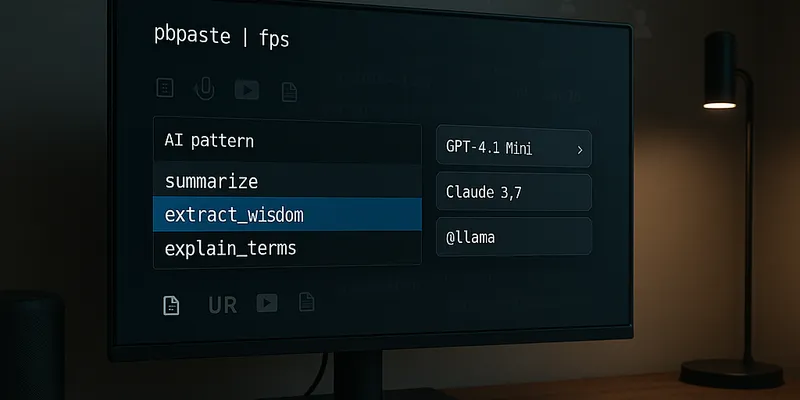
I have been using fabric to run LLM prompts on text. It's like having a Swiss Army knife of LLM tools - you feed it text, and it helps analyze it in different ways. With 31k+ GitHub stars, lots of people find it useful.
But here's the thing: there were too many patterns available. I kept staring at my screen trying to remember how they are named. Plus, I wanted to have the flexibility to choose different LLM models without having to memorize their names.
The solution
I used fzf, a fuzzy finder tool, to create searchable menus for fabric. Instead of memorizing commands, I just:
- Send text to fabric
- Type any parts of what I want - fzf is smart about matching:
xwisfinds "extract_wisdom"sumtextmatches "summarize_text"
- Press enter to run
The magic happens with two shell commands (add to .zshrc or .bashrc):
fp- Pick a pattern with fuzzy searchfps- Same smart matching, but for both model and pattern
Here's the code that makes it work:
# Fabric CLI Helper Functions
# Interactive selection of models and patterns for fabric AI tool
# Requirements: fabric(https://github.com/danielmiessler/fabric), fzf(https://github.com/junegunn/fzf)
#
# Usage Examples:
#   Model + Pattern Selection (fps alias):
#     fps -u <url>                    # Process URL content
#     pbpaste | fps                   # Process clipboard content
#     yt <youtube_url> | fps          # Process YouTube transcript
#     echo "text" | fps               # Process any text content
#
#   Pattern Selection Only (fp alias):
#     fp -u <url>                     # Use default model with URL
#     pbpaste | fp                    # Use default model with clipboard
#     yt <youtube_url> | fp           # Use default model with transcript
#     cat file.txt | fp               # Process any text content

# Handle stdin input for fabric functions
_fabric_handle_input() {
  if [ -t 0 ]; then
    return 1  # No stdin
  else
    cat       # Return stdin content
    return 0
  fi
}

# Select a pattern using fzf
_fabric_select_pattern() {
  fabric -l | fzf --height 40% --border --ansi --prompt="Select pattern: "
}

# Select and run fabric with a pattern
# Usage: fabric_with_pattern [additional_args...]
fabric_with_pattern() {
  local input=""
  local has_stdin=0

  if input=$(_fabric_handle_input); then
    has_stdin=1
  fi

  local pattern=$(_fabric_select_pattern)
  [ -z "$pattern" ] && { echo "No pattern selected."; return 1; }

  if [ $has_stdin -eq 1 ]; then
    echo "$input" | fabric --pattern "$pattern" "$@"
  else
    fabric --pattern "$pattern" "$@"
  fi
}

# Select and run fabric with both model and pattern
# Usage: fabric_with_model_pattern [additional_args...]
fabric_with_model_pattern() {
  local input=""
  local has_stdin=0

  if input=$(_fabric_handle_input); then
    has_stdin=1
  fi

  local model_line=$(fabric -L | fzf --height 40% --border --ansi --prompt="Select model: ")
  [ -z "$model_line" ] && { echo "No model selected."; return 1; }

  local model=$(echo "$model_line" | sed -E 's/.*[[:space:]]([^[:space:]]+)$/\1/')

  local pattern=$(_fabric_select_pattern)
  [ -z "$pattern" ] && { echo "No pattern selected."; return 1; }

  if [ $has_stdin -eq 1 ]; then
    echo "$input" | fabric --model "$model" --pattern "$pattern" "$@"
  else
    fabric --model "$model" --pattern "$pattern" "$@"
  fi
}

# Get YouTube transcript with fabric
# Usage: yt <video_link>
yt() {
  local video_link="$1"
  fabric -y "$video_link" --transcript
}

# Aliases for convenience
alias fp='fabric_with_pattern'
alias fps='fabric_with_model_pattern'
Also available on GitHub Gist.
Using It Day-to-Day
It's as simple as:
fp -u example.comto analyze a websitepbpaste | fpto analyze clipboard contentcat file.txt | fpsto analyze a file with a specific model
The menu pops up, you pick what you want, and fabric does the rest.
Making It Work for You
You know how your phone probably has dozens of apps, but you only use a handful regularly? It's the same with fabric patterns. While having options is great, too many choices can slow you down.
I cleaned up my pattern collection by:
- Keeping only the patterns I actually use
- Tweaking the remaining ones to work exactly how I want
Since patterns are just markdown files, changing them is as easy as editing a text file.
Why This Matters
I'm not reinventing the wheel here. These are just small tweaks that make fabric feel more natural to use. But sometimes that's all you need - tools that work the way your brain works.
Before, I'd hesitate to use fabric because remembering all the commands felt like work. Now? It's just copy, paste, pick, and done. If you use fabric, give these helpers a try.