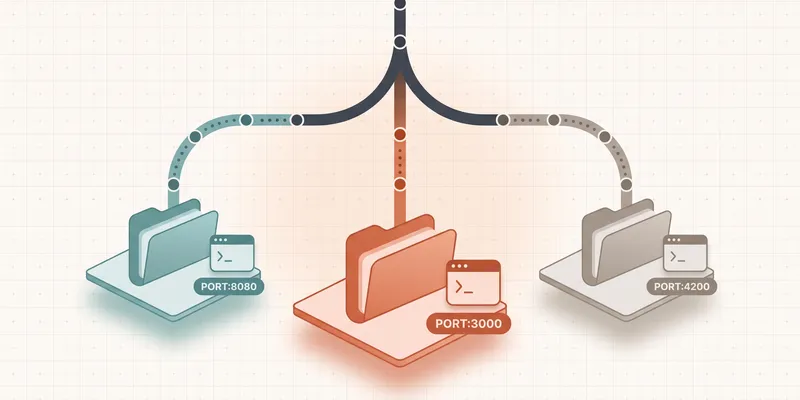
I’ve had this happen more times than I can count. I finish implementing changes for a ticket, put it into code review, and start the next one. Twenty minutes later, a reviewer asks for a 2-line change on the first ticket.
The change could take a few minutes for me to make but getting back to the right code can take longer.
My current branch already has modified files. Maybe the application is running with some local state I’ll need again, or I have configured the env variables differently for what I am currently working on. I can stash everything, switch branches, make the fix, switch back, restore the stash, and hope I didn’t forget which migration or environment variable belonged to which task.
Or I can make a work-in-progress commit that I never wanted in the branch. Or create another temporary branch whose name I’ll forget soon. Or leave the review sitting there until I finish my current work.
All of those work to some extent, and I have done them in the past. But the problem is that they turn a tiny review comment into a small ceremony.
Git worktrees give me a better option: keep multiple branches checked out at the same time, in separate directories.
What Git worktrees give you
Git worktrees give you a separate working directory per branch, all in the same repository. You can keep more than one branch checked out at the same time, each with its own files, editor state, and running dev server.
A branch and a worktree aren’t the same thing
A branch is a movable reference to a commit. A working tree is the checked-out set of files I edit. A worktree, in Git’s terminology, is that working tree plus the Git metadata that makes it an independent checkout.
My normal clone is already one worktree (Git calls it the main worktree). I can attach more linked worktrees to the same repository, with a different branch checked out in each one.
For example:
~/code/shop/                    # main worktree, branch: feature/new-checkout
~/code/shop.review-fix/         # linked worktree, branch: fix/payment-review
~/code/shop.order-history/      # linked worktree, branch: feature/order-history
These directories belong to the same repository. They share Git’s object database and refs, while keeping per-worktree state such as HEAD and the index separate (Git worktree documentation).
In practical terms, each directory has its own checked-out files, staged changes, and untracked files. I can keep an editor and terminal open in each one, leave the new checkout work exactly as it is, address the review in shop.review-fix, and return without stashing.
The cognitive cost of context switching is still there, but the Git housekeeping is gone. My editor of choice, Zed, has built-in worktree support with a worktree picker in the command palette, so opening a different worktree is one command away.
Creating the review-fix worktree with Git
Suppose I’m in ~/code/shop, working on feature/new-checkout, and the earlier branch is called fix/payment-review.
First I create a linked worktree for the existing branch:
git worktree add ../shop.review-fix fix/payment-review
My current directory stays on feature/new-checkout, including all its unfinished changes.
git worktree list shows every attached worktree:
~/code/shop             7db81af [feature/new-checkout]
~/code/shop.review-fix  b132aa0 [fix/payment-review]
Now I can handle the review in the review-fix worktree:
cd ../shop.review-fix
# make the requested change
git add . && git commit -m "Fix payment retry condition" && git push
When DevQA is finished and I don’t need the checkout anymore:
cd ../shop
git worktree remove ../shop.review-fix
git branch -d fix/payment-review
Branch deletion is a separate step in native Git. Git normally refuses to remove a dirty worktree, and it also refuses to check out the same branch in another worktree unless I override its safeguards (Git worktree commands and options).
For a brand-new task, I can create the branch and worktree together:
git worktree add -b feature/order-history ../shop.order-history main
That creates feature/order-history from main and checks it out in ../shop.order-history.
This is already enough to improve the review interruption. The part that started to annoy me came next.
Every new directory needs its project setup
A linked worktree contains the tracked files from its branch. My .env, node_modules, build output, local database, and other ignored files belong to a particular working directory. A new worktree won’t magically have them.
So the first few minutes often become:
cp ../shop/.env .env
npm install
npm run generate
Then I remember that the dev server in another worktree already owns port 3000.
I can solve this with a shell function or a project script, but once worktrees become a daily workflow, the function starts collecting branch naming rules, directory naming rules, setup steps, cleanup steps, and special cases.
Where Worktrunk comes in
Worktrunk wraps Git worktrees with a branch-oriented CLI and lifecycle hooks. I still get ordinary Git worktrees underneath. Worktrunk takes care of the repetitive setup around them.
Making Worktrunk do the boring parts
On macOS or Linux with Homebrew, the current installation command is:
brew install worktrunk
wt config shell install
The shell integration matters because wt switch needs to change the current shell’s directory (Worktrunk installation guide).
Now I can create and enter a worktree with:
wt switch --create feature/order-history
Worktrunk addresses worktrees by branch name and calculates the directory from a configurable template. If the branch already has a worktree, wt switch moves me into it; if not, wt switch --create makes one. With no argument, it opens an interactive picker with branch status and diff previews (wt switch documentation).
The commands I use most are wt switch, wt list (reference), and wt remove. wt remove defaults to the current worktree and only deletes the branch when Worktrunk determines it's already merged; --no-delete-branch keeps it (wt remove documentation). See the Worktrunk reference for the full list.
Project hooks turn a checkout into a usable workspace
Every worktree starts as a clean slate. The same setup repeats every time: install dependencies, run project generators, register the worktree with the rest of the toolchain on switch, and unregister it on removal. My hooks do all four from a shared config file, so creating a worktree returns me to "ready to work." The full reference, including the pre-merge and post-merge lifecycles and the approval flow for shared configs, is in the Worktrunk hook docs.
Worktrunk reads those hooks from .config/wt.toml. They fire at lifecycle points like pre-start (before the worktree is usable) and post-start (after, in the background). I keep blocking setup in pre-start and push anything slow to post-start so creating a worktree returns fast. There's also post-switch, which fires on every checkout rather than just creation. That's the right home for work that needs to track the current branch, like the Herd link in the closing config.
Giving every worktree its own dev server
Separate source directories can still fight over shared resources. Two applications can’t both listen on port 3000, and two test runs pointed at the same mutable database can produce some creative failures. But the upside is that a long test suite in one worktree doesn’t block me from checking out main in another, since the other worktree isn’t competing for the same resources.
Worktrunk’s hash_port template filter derives a stable port between 10000 and 19999 from the branch name. Its tether step runs a process in its own process group and tears that group down when the worktree is removed.
# .config/wt.toml

[post-start]
server = "wt step tether -- npm run dev -- --port {{ branch | hash_port }}"

[list]
url = "http://localhost:{{ branch | hash_port }}"
The server starts in the background, so creating the worktree doesn’t wait for a long-running process (Worktrunk’s per-worktree dev-server recipe).
Worktrees fit coding agents unusually well
Worktrunk becomes even more useful when I have multiple LLM coding agents working against the same repository.
Giving two agents the same working directory is an invitation to edit the same files, stage each other’s changes, or run cleanup commands against work neither agent created. A worktree gives each agent its own branch, index, and checked-out files.
Worktrunk can create the worktree, run the project hooks, move into it, and start an agent in one command:
wt switch --create --execute=claude feature/order-history -- \
  "Add order history to the account page"
I can run a second agent in another terminal with the same pattern. Arguments after -- are passed to the launched command; the blocking pre-start hooks finish before --execute runs, while post-start hooks continue in the background, so each agent begins in a prepared directory (Worktrunk’s --execute workflow).
Their changes can still conflict when I merge the branches, and they can still collide through a shared database, port, container name, or generated cache outside the worktree. The filesystem boundary solves a specific class of problems, and I still need to divide the tasks sensibly and review what comes back.
I also don’t need five agents running because the tool makes it possible. Parallel work is useful when the tasks are independent enough that the merge and review cost stays lower than the time saved.
Trade-offs and takeaway
The trade-offs, and when I’d skip
Worktrees have a few edges that are easy to miss:
- Every worktree duplicates the checked-out project files. Dependencies and build output can consume much more disk space than the source.
- Git normally allows a branch to be checked out in only one worktree at a time. I treat the directory and branch as a pair.
- State outside the worktree needs explicit handling. For example: ignored files and config need to be copied or generated, and shared resources (dev servers, databases, Docker, caches) need unique names or ports.
- Worktrees are easy to make and easy to forget. Usually, I get remove the worktrees after the work has been marked as done by QA testing.
- Removing a directory with
rm -rfleaves worktree administration behind. I usegit worktree removeorwt remove;git worktree prunecleans up stale metadata after a manual deletion (Git worktree cleanup). - A third-party Git hook that runs on
post-checkoutcan short-circuitgit worktree addif it depends on a binary that doesn't exist in a fresh worktree. Patch the hook to exit cleanly when the dependency is missing, orwt switch --createfails before it can start. - Git still documents submodule support across multiple worktrees as incomplete, so I’d test the workflow carefully in a superproject with submodules (Git worktree bugs).
I’d skip worktrees entirely when those edges outweigh the benefits, like if I’m on one branch at a time, the repo is huge and disk is tight, or the IDE doesn’t support worktree.
There’s also the human limit. Keeping four tasks open in four directories makes switching between them mechanically cheap, but it doesn’t make holding four trains of thought equally cheap. What works for me is to keep the main task untouched, handle the review or production fix in another worktree, then remove it when the branch is done. When an agent can take an independent task, I give it a worktree too.
My takeaway
Git worktrees turn branches into persistent working directories. That alone removes the stash-switch-unstash loop from review fixes and interruptions.
Worktrunk earns its place when creating a directory isn’t enough. It gives me short branch-based commands, project hooks, repeatable paths, cleanup checks, and a clean way to launch tools inside a prepared worktree.
For a sense of what the resulting .config/wt.toml actually looks like, here’s the version I shipped in a real repository:
[post-start]
node = "sh '{{ primary_worktree_path }}/scripts/worktrunk/setup-node.sh'"
php = "sh '{{ primary_worktree_path }}/scripts/worktrunk/setup-php.sh' '{{ branch }}' '{{ worktree_name }}' '{{ primary_worktree_path }}'"

[post-switch]
link = "sh '{{ primary_worktree_path }}/scripts/worktrunk/herd-link.sh' '{{ branch }}' '{{ worktree_name }}'"

[pre-remove]
unlink = "sh '{{ primary_worktree_path }}/scripts/worktrunk/herd-unlink.sh' '{{ branch }}' '{{ worktree_name }}'"
Every script takes the worktree's name, does the project-specific work, and the cleanup script mirrors the setup script. {{ primary_worktree_path }} is what lets each script reach the canonical .env without me ever hardcoding a path.
I’d start with the native commands until the model makes sense:
git worktree add ../shop.review-fix fix/payment-review
git worktree list
git worktree remove ../shop.review-fix
Then I’d add Worktrunk when the repeated environment setup starts getting irritating.